How can I be found by search engines?
Let me introduce you to a situation that will surely sound familiar:
Today I was talking with a friend about my new website while taking a walk, and she explained that, in her experience, it can take years for a new website to be discoverable in Google results.
And suddenly, as we were chatting, it hit me: Did I forget something during the release? Absolutely! When I released my new website, I neglected something very, very important. I was too focused on hitting the advanced release date. In the process, I had completely forgotten to get indexed by the Google search engine.
So I walked straight home, sat back down at the computer, and got to work.
She's completely right. If you don't take care of it yourself, Google indexing is really a game of chance. And even when you are finally found, your site is often buried way down in the search results. But there are two better ways of going about this, which I'd like to share today. Using this approach, this site was indexed within a day and achieved a high search ranking. Problem solved! Getting direct feedback from users saved me there. I am now discoverable and can get back to focusing on my first blog post in peace. And I already know what I'm going to write about...
Now you can benefit too.
Introduction
I would like to show you how quickly and simply something like this can be achieved. Don't worry, even if you are not technically savvy, you'll benefit from this post without any programming knowledge. Go for it!
By ensuring a good SEO score during the already completed performance optimization phase of development and using the Google Search Console strategically, I was able to resolve my situation within one day (24 h).
Do you work in a marketing team or are you the CEO of a small company wanting to attract more customers to your website? Wouldn't it be great if your customers found you all on their own?
Are you starting your own business or applying with your portfolio website, and want to be found? My site can now easily be found on Google, even if you don't know the domain yet.
Want to learn more about this mysterious "SEO" thing? Buckle up, here we go!
I will cover the following technologies & topics. This post remains reader-friendly. If you have further questions, we can gladly schedule an appointment for a consultation:
- Google Search Console
- Search Engine Optimization (SEO)
- Sitemap File
Google Search Console
The Google Search Console (GSC / SC) is a Google service for business users.
Using the tool is possible without any additional costs. What is required, however, is a paid Google Business Account. The whole setup can easily be done during the free trial period, making it mostly free. This is great for individuals and companies in the startup phase who want to keep their expenses as low as possible. In the long run, a Google Workspace license doesn't cost the earth and is, in my opinion, a sensible long-term investment.
So what exactly is needed again?
- A Google Workspace account with completed domain ownership verification (setting a DNS record)
- Access to the DNS settings of your trusted domain registrar
- Access to the source code or the admin panel of your own website to create a sitemap file (more on this at the end of the post). Optional but advantageous: A good SEO score (more on that in the next section)
This makes indexing quick and simple. Learn more at: https://developers.google.com/search/docs/monitor-debug/search-console-start
If the Google search console is of interest to you, but you need more information, we can arrange a consultation.
Search Engine Optimization (SEO)
Search engine providers want users to be happy with the results they deliver. That's why they want to filter pages by content. However, over time, it has also become clear that users prefer pages that load quickly and are accessible to people with disabilities of any kind. Pages with these characteristics are therefore of high value to them, i.e., high quality.
Modern search engines therefore use automated systems to sort pages and evaluate a website's quality: the Search Engine Optimization (SEO) score. Sites that score well here secure a high place in the search results. Modern search engines like Google want to deliver appealing results so that users find what they are looking for quickly and reliably.
So wouldn't it be great to get a good SEO score?
Good performance, accessibility, and user-friendliness directly impact search engine optimization or the Search Engine Optimization (SEO) score. Sites that perform well here secure a better place in the search results of modern search engines.
If you want to see your current SEO rating, you can run a free analysis at the push of a button on this page: https://pagespeed.web.dev/
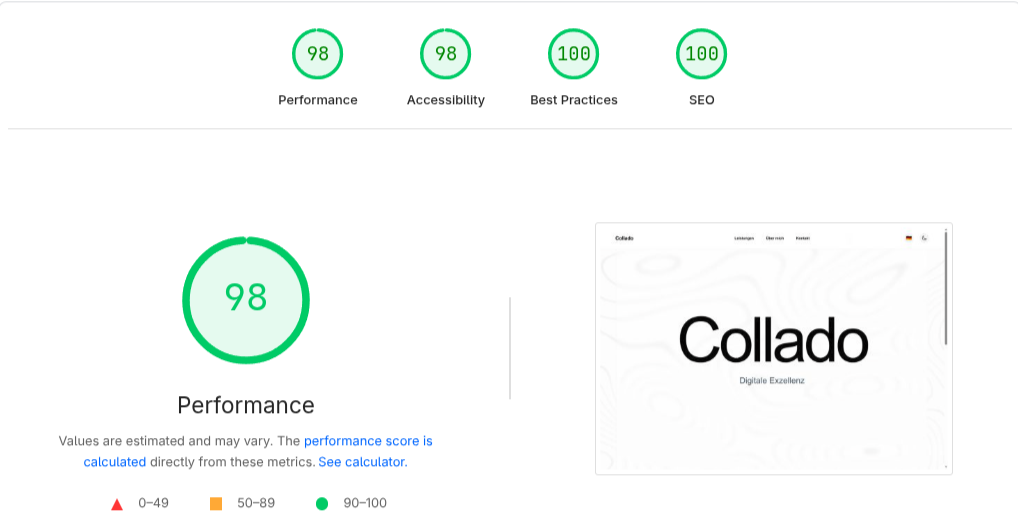
Auf diesem Bild ist unser heutiges Rating zu sehen (23. - 24. April, 2026)
So it all depends on whether the developers & designers of your website paid attention to good quality. For websites we develop, thorough SEO optimization goes without saying. We provide our customers with a state-of-the-art, professional presence with high-end performance.
Sitemap
The sitemap XML file, which is submitted to the Google Search Console, informs the search engine provider about the structure and content of your site. It can be created manually and needs to be kept as up-to-date as possible. Since this additional step quickly becomes tedious for a blog, the creation of this file can also be automated. Almost every web framework has a plugin or another solution for this.
The Headless CMS configured for our clients comes with these functionalities built-in. Contact us now to learn more.
And with that, we have reached the end.
I hope this post was valuable to you. Thanks for reading!